
Free Media Player Download
foobar2000

Software Review:
For programs like this, a lot of people would normally use resource-intensive programs like iTunes which have graphics-rich interfaces. Like the original version of Winamp, foobar2000 has opted for a simple yet sleek interface which uses little system resources while playing your music collection.
With this audio player, you can very easily and very simply playback your music. Unlike the very crash-prone programs like iTunes, foobar2000 does not crash which means hours of enjoyment.
Version 2.24.5 is a freeware program which does not have restrictions and it's free so it doesn't cost anything.
 Zoom: foobar2000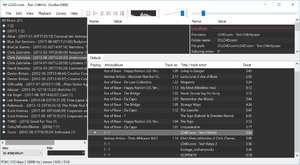
With this audio player, you can very easily and very simply playback your music. Unlike the very crash-prone programs like iTunes, foobar2000 does not crash which means hours of enjoyment.
Version 2.24.5 is a freeware program which does not have restrictions and it's free so it doesn't cost anything.
Virus and Malware Tests:
For security reasons, you should also check out the foobar2000 download at LO4D.com which includes virus and malware tests. Additional screenshots of this application download may be available, too.Download foobar2000
3.1 MB - Filesize
Details
| Publisher: | foobar2000 |
| License: | Freeware |
| OS/Platform: | Windows 7, Windows 8 / Vista / XP |
| Filesize: | 3.1 MB |
| Filename: | foobar2000_v2.24.5.exe |
| Cost (Full Version): | Free |
| Rating: |
4.5 out of 5 based on 66 ratings.
|
| Notes |
|
| TrustRank | Based on many factors, we give this program a Trust rating of 9 / 10. |
 |
|