WinSCP Icon

5.0.7


Update Submitted 9 May 2012
WinSCP Review:

A free FTP/SFTP client

Zoom InZoom: WinSCP
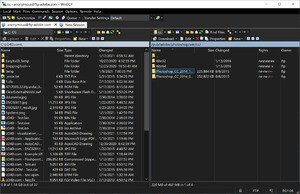
WinSCP Screenshot
WinSCP screenshot
WinSCP is a open source and completely free FTP client for the Windows OS. It also functions natively as SFTP, SCP and FTPS clients.

With an active development community, WinSCP is unfortunately not as well known as certain rivals like FileZilla or paid FTP clients like that from Globalscape (CuteFTP). Actually, my first impression of WinSCP was that it is highly advanced and well done simply for the fact that unlike every other FTP client I've tried, WinSCP lists hidden folders on a UNIX system (prefixed with a period .) by default.

One of the strongest pillars of WinSCP is its support for security and encryption. With many of todays popular clients still defaulting to non-secured connections, this client actually defaults to secure connections over SFTP. Whether you're using an open WiFi network or you're in a country which monitors what you're doing online, security these days is a must. It goes without saying that you can have multiple sessions open as with almost all top-rated FTP/SFTP clients.

Upon launching WinSCP, we noticed immediately that the connect screen looks a lot like our favourite SSH/Telnet client PuTTY (and WinSCP can also launch PuTTY from the command menu). That definitely isn't a black mark against this client because in seriousness, a bloated layout with colourful flashy icons isn't what professionals are interested in seeing. Another interesting note is the option to switch between a Windows Explorer-like interface and the default Commander interface). We certainly preferred the default interface.

As with the connect dialog, the preferences also resemble popular programs like PuTTY. Each setting can be found under preferences in a streamlined list.

Editing remote files is quite simple. In fact when you do edit a file, you're not actually editing it live on the server. The client downloads the file first, allows you to edit it and then uploads the revision to the server when you're done.

The strong point of WinSCP is its inclusion of almost every possible feature you would need in an FTP/SFTP client while remaining secure. Highly recommended.


WinSCP 5.0.7 is licensed as Freeware for the Windows operating system / platform without restrictions. WinSCP is available to all software users as a free download (Freeware).

Filed Under:

  • Winscp Review and Download

WinSCP Alternatives


  • Download FTP Clients
    Canadian Content features reviews and download mirrors of some popular and not-so-popular FTP clients designed both for professional and home use.
  • Download Freeware FTP Clients
    If you're looking for a free solution to WinSCP, check out some of the freeware downloads available in the ftp client category. They contain no strings and are available at zero cost.

Review WinSCP

WYSIWYG Editor - Please login

Share WinSCP Free


Additional Information About WinSCP Download


The review and download of this program might become outdated at some point. Though our editors try to keep links and information up-to-date, we unfortunately can't always guarantee that this is the case just like other sites like Cnet Download.com. WinSCP is not published by Canadian Content and actual downloadable executable files are not hosted on our servers, unless otherwise noted. You may also skip to the free download of WinSCP 5.0.7 now or find more free software like this in FTP Clients. Since we merely provide links to downloads and reviews of programs like WinSCP, we disclaim all liability of programs hosted outside the CanadianContent.net domain. Instructions on how to install WinSCP are included on the download page.

Program Information

WinSCP Awards:
WinSCP has received an Editors' Pick award!
Clean Software!
Publisher: winscp
License: Freeware
OS/Platform: Windows 7, Windows 8 / Vista / XP
Filesize: 2.9 MB
Filename: winscp507setup.exe
Cost (Full Version): Free
Rating:
5 out of 5 based on 1 rating.
Notes
  • This title has been tested as Clean by staff.
  • This file download is licensed as freeware for Windows 7, Windows 8 / Vista / XP.

TrustRank Based on many factors, we give this program a Trust rating of 10 / 10.
Software from winscp, including WinSCP Review And Download is rated 10 out of 10
WinSCP Download

Free Download

Download WinSCP Free
2.9 MB - Filesize
This free download is free and virus-free.