
Antivirus Program Download
Trojan Slayer

Software Review:
Trojan Slayer is an old and outdated virus removal program which concentrates on trojans which were known and sometimes common in the mid-2000s.
The program includes a very simple user interface which has its main tools in the top bar where options include: Learn, Report, Block, Delete and Replace.
The application isn't very useful since it hasn't been updated in years and of course its effectiveness against modern threats is non-existent.
Everything that Trojan Slayer does is recorded in a log file that can be posted on online security forums or for personal investigative use.
Trojan Slayer 2.0.0 is a shareware program and can be used as a demo to try the software until the free trial period has ended. A full version of the program is available after the trial period ends.
 Zoom: Trojan Slayer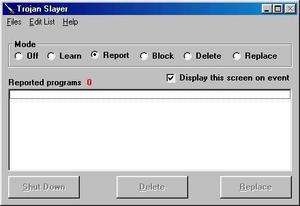
The program includes a very simple user interface which has its main tools in the top bar where options include: Learn, Report, Block, Delete and Replace.
The application isn't very useful since it hasn't been updated in years and of course its effectiveness against modern threats is non-existent.
Everything that Trojan Slayer does is recorded in a log file that can be posted on online security forums or for personal investigative use.
Trojan Slayer 2.0.0 is a shareware program and can be used as a demo to try the software until the free trial period has ended. A full version of the program is available after the trial period ends.
Virus and Malware Tests:
For security reasons, you should also check out the Trojan Slayer download at LO4D.com which includes virus and malware tests. Additional screenshots of this application download may be available, too.Download Trojan Slayer
0.48 MB - Filesize
Details
| Publisher: | Leithauser Research |
| License: | Shareware |
| OS/Platform: | Windows 7, Windows 8 / Vista / XP / NT |
| Filesize: | 0.48 MB |
| Filename: | tsarc.exe |
| Cost (Full Version): | $25 (USD) |
| Rating: |
4.5 out of 5 based on 74 ratings.
|
| Notes |
|
| TrustRank | Based on many factors, we give this program a Trust rating of 9 / 10. |
 |
|