
Image Editor Download
Paint Express

About this software:
The image editor fully supports ICO, CUR, BMP, reads PNG, JPG, JPEG files. Features:Create multi-format icons/cursors from existing images in one-click; Convert images with transparency from Photoshop, or Paint Shop into Windows XP icon/cursor or 32-bit bitmap with alpha channel; View, edit images using editing tools, filters, effects; Capture any image from the desktop screen; Search on the PC and extract resources from EXE, DLL, OCX file.
The image editor fully supports ICO, CUR, BMP, reads PNG, JPG, JPEG files.
Paint Express 1.31 is a shareware program and can be used as a demo to try the software until the free trial period has ended. A full version of the program is available after the trial period ends.
 Zoom: Paint Express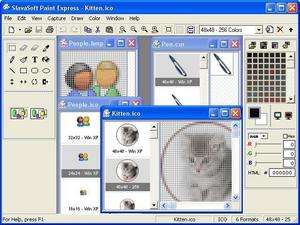
From SlavaSoft Inc:
The image editor fully supports ICO, CUR, BMP, reads PNG, JPG, JPEG files.
Paint Express 1.31 is a shareware program and can be used as a demo to try the software until the free trial period has ended. A full version of the program is available after the trial period ends.
Virus and Malware Tests:
For security reasons, you should also check out the Paint Express download at LO4D.com which includes virus and malware tests. Additional screenshots of this application download may be available, too.Download Paint Express
1.72 MB - Filesize
Details
| Publisher: | SlavaSoft Inc |
| License: | Shareware |
| OS/Platform: | Windows 7, Windows 8 / Vista / XP / NT |
| Filesize: | 1.72 MB |
| Filename: | paintexpress.zip |
| Cost (Full Version): | $39.95 (USD) |
| Rating: |
4.6 out of 5 based on 5 ratings.
|
| TrustRank | Based on many factors, we give this program a Trust rating of 9 / 10. |
 |
|