
Networking Program Download
Net Monitor for Employees Professional

About this software:
The application allows you to see live screens of remote computers or show you screen to students. You can take control of a remote PC by controlling the mouse and keyboard. This way, you can always watch what users are doing on the remote computer. Additionally you can also record student's screens.
Net Monitor for Employees Professional 6.4.6 is a shareware program and can be used as a demo to try the software until the free trial period has ended. A full version of the program is available after the trial period ends.
 Zoom: Net Monitor for Employees Professional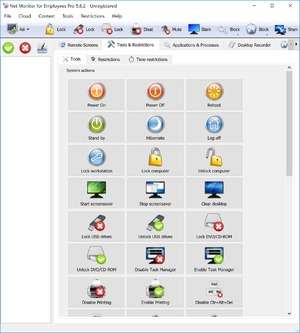
Net Monitor for Employees Professional 6.4.6 is a shareware program and can be used as a demo to try the software until the free trial period has ended. A full version of the program is available after the trial period ends.
Virus and Malware Tests:
For security reasons, you should also check out the Net Monitor for Employees Professional download at LO4D.com which includes virus and malware tests. Additional screenshots of this application download may be available, too.Download Net Monitor for Employees Professional
13.03 MB - Filesize
Details
| Publisher: | EduIQ |
| License: | Shareware |
| OS/Platform: | Windows 7, Windows 8 (64-bit, 32-bit) / Vista / XP |
| Filesize: | 13.03 MB |
| Filename: | nmemplpro.exe |
| Cost (Full Version): | $299.95 (USD) |
| Rating: |
4.5 out of 5 based on 13 ratings.
|
| Notes |
|
| TrustRank | Based on many factors, we give this program a Trust rating of 9 / 10. |
 |
|