
Free Internet Utility Download
Google Books Downloader

Software Review:
GBooksDownloader or simply Google Books Downloader is a small and useful utility for people interested in downloading copies of their favourite books from the free service run by Google.
Using this software is quite simply and using it involves simply pasting in the url of the book you would like to download, select the output format and finally the resolution you would like to save the book format in.
In the way of output formats, it is usually best to save the file as an Adobe PDF as it's the most portable format and involves less upkeep. If you're really not into PDF files, you can also save Google Books as JPEG files, but that isn't really recommended.
Version 2.31 is a freeware program which does not have restrictions and it's free so it doesn't cost anything.
 Zoom: Google Books Downloader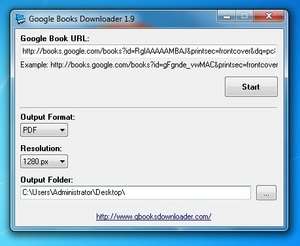
Using this software is quite simply and using it involves simply pasting in the url of the book you would like to download, select the output format and finally the resolution you would like to save the book format in.
In the way of output formats, it is usually best to save the file as an Adobe PDF as it's the most portable format and involves less upkeep. If you're really not into PDF files, you can also save Google Books as JPEG files, but that isn't really recommended.
Version 2.31 is a freeware program which does not have restrictions and it's free so it doesn't cost anything.
Virus and Malware Tests:
For security reasons, you should also check out the Google Books Downloader download at LO4D.com which includes virus and malware tests. Additional screenshots of this application download may be available, too.Download Google Books Downloader
0.8 MB - Filesize
Details
| Publisher: | Gbooksdownloader |
| License: | Freeware |
| OS/Platform: | Windows 7, Windows 8 (64-bit, 32-bit) / Vista / XP |
| Filesize: | 0.8 MB |
| Filename: | gbooks.exe |
| Cost (Full Version): | Free |
| Rating: |
3.8 out of 5 based on 14 ratings.
|
| Notes |
|
| TrustRank | Based on many factors, we give this program a Trust rating of 7 / 10. |
 |
|