
Free Image Editor Download
GIMP

Software Review:
GIMP (GNU Image Manipulation Program) is a free software raster graphics editor. It is primarily employed as an image retouching and editing tool and is freely available in versions tailored for most popular operating systems including Microsoft Windows, Apple Mac OS X, and Linux.
Any self-respecting Linux user or on that note, any self-respecting graphics designer should know about this program. It is *the* open source graphics and image editing suite and has been developing into a worthy contender for years.
Version 3.0.4 is a freeware program which does not have restrictions and it's free so it doesn't cost anything.
 Zoom: GIMP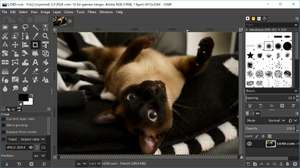
Any self-respecting Linux user or on that note, any self-respecting graphics designer should know about this program. It is *the* open source graphics and image editing suite and has been developing into a worthy contender for years.
Version 3.0.4 is a freeware program which does not have restrictions and it's free so it doesn't cost anything.
Virus and Malware Tests:
The program has been tested with several antivirus applications and has tested clean of viruses, malware or trojans.Download GIMP
19.4 MB - Filesize
Details
GIMP Awards: |
|
| Publisher: | GIMP Project |
| License: | Freeware |
| OS/Platform: | Windows 7, Windows 8 / Vista / XP |
| Filesize: | 19.4 MB |
| Filename: | gimp-3.0.4-setup.exe |
| Cost (Full Version): | Free |
| Rating: |
5 out of 5 based on 1 rating.
|
| Notes |
|
| TrustRank | Based on many factors, we give this program a Trust rating of 9 / 10. |
 |
|