
Free Benchmarker Download
CPU Eater

About this software:
This application will simply initiate a load upon all system CPU(s).
CPU Eater was created for testing Process Lasso's ProBalance technology. However, it can be used to test anything for the effect on overall system responsiveness.
Usage instructions:
 Zoom: CPU Eater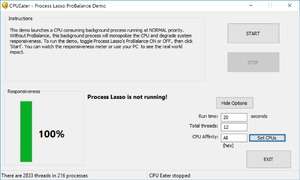
CPU Eater was created for testing Process Lasso's ProBalance technology. However, it can be used to test anything for the effect on overall system responsiveness.
Usage instructions:
- Download and run the above link appropriate to your operating system (32-bit or 64-bit)
- It will automatically start the CPU Eater control application for you
- Press the START button to initiate the test in a background process running at NORMAL priority
- If you PC seems to freeze because Process Lasso's ProBalance is not active, WAIT and everything will return to normal after the test terminates in a minute (or however long you specified).
Version 10.2.0.34 is a freeware program which does not have restrictions and it's free so it doesn't cost anything.Virus and Malware Tests:
For security reasons, you should also check out the CPU Eater download at LO4D.com which includes virus and malware tests. Additional screenshots of this application download may be available, too.
Download CPU Eater
1.0 MB - Filesize
Details
| Publisher: | Bitsum Technologies |
| License: | Freeware |
| OS/Platform: | Windows 7, Windows 8 / Vista / XP |
| Filesize: | 1.0 MB |
| Filename: | CPUEaterDist32.zip |
| Cost (Full Version): | Free |
| Rating: |
4.5 out of 5 based on 53 ratings.
|
| Notes |
|
| TrustRank | Based on many factors, we give this program a Trust rating of 9 / 10. |
 |
|