
Free Defragmenter Download
Auslogics Disk Defrag

Software Review:
We're pleased to be able to finally present a great freeware disk defragmentater and present you with Disk Defrag. The interface of Disk Defrag from Auslogics couldn't be easier to use and it's completely straight forward.
To get started defragging your drive, simply choose the hard drive you want to defrag from the drop-down list and Disk Defrag will quickly display the size along with current free and used space including a pretty pie graph. From there, click away and start defragging you drive OR analyse it first to see whether it even needs to be defragged.
Version 12.0.0.1 is a freeware program which does not have restrictions and it's free so it doesn't cost anything.
 Zoom: Auslogics Disk Defrag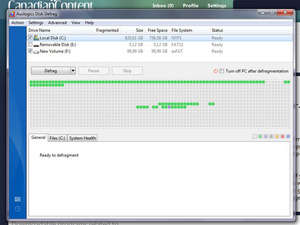
To get started defragging your drive, simply choose the hard drive you want to defrag from the drop-down list and Disk Defrag will quickly display the size along with current free and used space including a pretty pie graph. From there, click away and start defragging you drive OR analyse it first to see whether it even needs to be defragged.
Version 12.0.0.1 is a freeware program which does not have restrictions and it's free so it doesn't cost anything.
Virus and Malware Tests:
For security reasons, you should also check out the Auslogics Disk Defrag download at LO4D.com which includes virus and malware tests. Additional screenshots of this application download may be available, too.Download Auslogics Disk Defrag
4.93 MB - Filesize
Details
Auslogics Disk Defrag Awards: |
|
| Publisher: | Auslogics Software Pty Ltd |
| License: | Freeware |
| OS/Platform: | Windows 7, Windows 8 (64-bit, 32-bit) / Vista / XP |
| Filesize: | 4.93 MB |
| Filename: | disk-defrag-setup.exe |
| Cost (Full Version): | Free |
| Rating: |
4.8 out of 5 based on 65 ratings.
|
| Notes |
|
| TrustRank | Based on many factors, we give this program a Trust rating of 10 / 10. |
 |
|