
Free Explorer Addon Download
AudioShell

Software Review:
AudioShell is a Windows Explorer addon which enables users to edit audio file data such as IDv3 tags directly from the shell or a Windows Explorer window.
The data from AudioShell appears in a yellow box which displays additional information about your MP3 files. It also added an additional tab to the file properties dialog box which allows you to edit files even from third-party applications.
The program is pretty basic and installation and usage is simple.
Version 2.3.6 is a freeware program which does not have restrictions and it's free so it doesn't cost anything.
 Zoom: AudioShell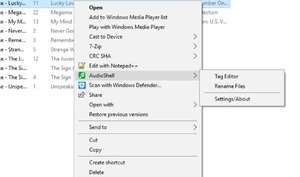
The data from AudioShell appears in a yellow box which displays additional information about your MP3 files. It also added an additional tab to the file properties dialog box which allows you to edit files even from third-party applications.
The program is pretty basic and installation and usage is simple.
Version 2.3.6 is a freeware program which does not have restrictions and it's free so it doesn't cost anything.
Virus and Malware Tests:
For security reasons, you should also check out the AudioShell download at LO4D.com which includes virus and malware tests. Additional screenshots of this application download may be available, too.Download AudioShell
1.1 MB - Filesize
Details
| Publisher: | Softpointer Inc |
| License: | Freeware |
| OS/Platform: | Windows 7, Windows 8 (64-bit, 32-bit) / Vista / XP |
| Filesize: | 1.1 MB |
| Filename: | AudioShell236.exe |
| Cost (Full Version): | Free |
| Rating: |
4 out of 5 based on 48 ratings.
|
| Notes |
|
| TrustRank | Based on many factors, we give this program a Trust rating of 8 / 10. |
 |
|